
Friday, July 31, 2026

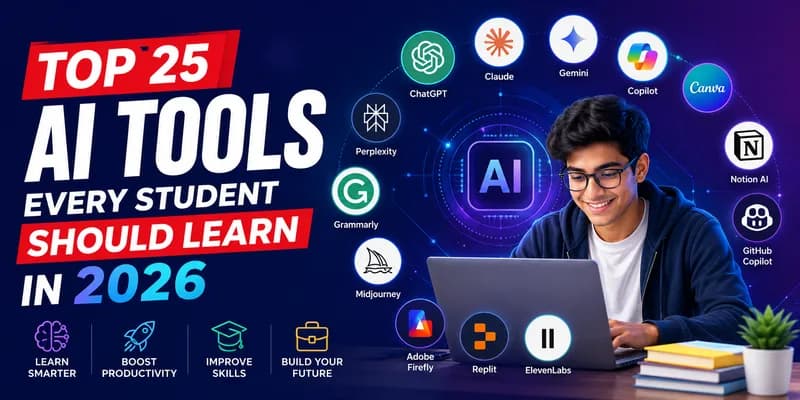
Top 25 AI Tools Every Student Should Learn in 2026
Artificial Intelligence (AI) is no longer just a technology for software engineers. In 2026, AI has become a daily companion for students across schools, colleges, and universities. From writing assignments and creating presentations to learning programming and preparing for interviews, AI tools can help students save time, improve productivity, and learn smarter.
However, using AI effectively is now becoming a valuable career skill. Companies are looking for graduates who know how to use AI responsibly to solve real-world problems.
In this guide, we'll explore the Top 25 AI tools every student should learn in 2026 and understand how they can help in academics and future careers.
Why Should Students Learn AI Tools?
Learning AI tools doesn't mean replacing your own thinking — it means improving it.
Students who know how to use AI can:
1) Complete assignments faster
2) Learn difficult concepts easily
3) Write better reports and emails
4) Improve coding skills
5) Create professional presentations
6) Prepare for interviews
7) Build stronger portfolios
8) Increase productivity
AI is becoming a workplace standard, making these skills valuable across almost every industry.
Top 25 AI Tools Every Student Should Learn
1. ChatGPT
One of the most popular AI assistants, ChatGPT helps students understand concepts, solve coding problems, brainstorm ideas, write assignments, summarize notes, and prepare for exams.
Best for: Learning, writing, coding, brainstorming
2. Claude
Claude is excellent for reading long PDFs, research papers, and generating detailed summaries. It's especially useful for college projects and report writing.
Best for: Research and document analysis
3. Google Gemini
Gemini integrates with Google Search, Docs, Gmail, and Drive, making it ideal for students already using Google's ecosystem.
Best for: Productivity and Google Workspace
4. Microsoft Copilot
Copilot helps create Word documents, Excel formulas, PowerPoint presentations, and email drafts using AI.
Best for: Office productivity
5. Perplexity AI
Perplexity provides AI-powered answers with references, making it useful for research and fact-checking.
Best for: Academic research
6. Grammarly AI
Beyond grammar correction, Grammarly now helps rewrite paragraphs, improve tone, and generate content ideas.
Best for: Writing assignments
7. Notion AI
Students can organize notes, create study plans, summarize lectures, and manage projects with Notion AI.
Best for: Study management
8. Canva AI
Create stunning presentations, posters, resumes, and social media graphics without professional design skills.
Best for: Design and presentations
9. Gamma
Gamma creates beautiful presentations from simple prompts in just minutes.
Best for: AI presentations
10. Tome AI
Turn ideas into interactive presentations complete with visuals and storytelling.
Best for: Project presentations
11. GitHub Copilot
An AI coding assistant that suggests code while programming.
Perfect for students learning:
> Python
> Java
> C++
> JavaScript
> SQL
Best for: Coding practice
12. Replit AI
Students can write, run, debug, and learn programming directly in the browser using AI assistance.
Best for: Beginners in coding
13. Cursor AI
Cursor is becoming a favorite AI-powered code editor among developers and students alike.
Best for: Software development
14. NotebookLM
Google's NotebookLM helps students ask questions based on their own notes and uploaded documents.
Best for: Personalized studying
15. QuillBot
Paraphrase content, improve writing, summarize documents, and check grammar.
Best for: Assignment writing
16. ElevenLabs
Generate realistic AI voiceovers for college presentations and multimedia projects.
Best for: Voice generation
17. HeyGen
Create AI-powered talking avatar videos for presentations and educational content.
Best for: Video projects
18. Synthesia
Create professional educational videos without appearing on camera.
Best for: Video presentations
19. Otter.ai
Automatically records lectures and converts speech into searchable notes.
Best for: Lecture notes
20. Fireflies AI
Record online classes and generate meeting summaries automatically.
Best for: Online learning
21. Midjourney
Generate creative AI artwork for projects, presentations, and design inspiration.
Best for: Creative design
22. Adobe Firefly
Create AI-generated images while respecting commercial licensing.
Best for: Graphic design
23. DALL·E
Generate custom illustrations from text prompts for assignments and creative work.
Best for: AI image generation
24. Runway ML
Edit videos using AI, remove backgrounds, generate clips, and improve video quality.
Best for: Video editing
25. Zapier AI
Automate repetitive tasks between apps without coding.
Students can automate:
1) Email notifications
2) Assignment reminders
3) Calendar events
4) File organization
Best for: Productivity automation
Which AI Tool Should Beginners Start With?
If you're just getting started, begin with these five:
A) ChatGPT
B) Google Gemini
C) Grammarly
D) Canva AI
E) Perplexity AI
These tools cover writing, research, presentations, productivity, and learning — making them ideal for students of all backgrounds.
Are AI Tools Safe for Students?
Yes, most popular AI tools are safe when used responsibly. Students should:
1. Verify important information from trusted sources.
2. Avoid sharing personal or sensitive information.
3. Use AI as a learning assistant instead of copying answers.
4. Follow school or university guidelines on AI usage.
Responsible use helps build knowledge while maintaining academic integrity.
How Learning AI Tools Improves Career Opportunities
Recruiters in 2026 increasingly value candidates who know how to work alongside AI. Whether you're interested in software development, cybersecurity, cloud computing, digital marketing, business analytics, or data science, AI literacy is becoming an essential professional skill.
Students who combine technical knowledge with AI-powered productivity often complete projects faster, solve problems more efficiently, and stand out during internships and job interviews.
Build Future-Ready Skills with Jetking
Knowing AI tools is a great starting point, but successful careers require strong technical fundamentals too. Students who combine AI with practical skills in Cloud Computing, Cyber Security, Networking, Programming, and Data Analytics are better prepared for the modern IT industry.
Jetking's industry-focused programs are designed to help students gain hands-on experience through practical labs, live projects, and career-oriented learning. By mastering both AI tools and core technology skills, students can confidently prepare for higher education, internships, and future IT careers.
Final Thoughts
AI is changing the way students learn, work, and build careers. The best approach isn't to rely entirely on AI but to use it as a smart learning partner. By exploring these 25 AI tools, students can improve productivity, enhance creativity, and develop skills that employers increasingly expect.
The earlier you start learning AI tools, the better prepared you'll be for the technology-driven careers of tomorrow.
FAQs (Best AI Tools)
Q1. Which AI tool is best for students in 2026?
ChatGPT remains one of the best all-around AI tools for students because it supports learning, coding, writing, research, and exam preparation.
Q2. Are AI tools free for students?
Many AI tools offer free plans with basic features. Premium versions provide advanced capabilities for power users.
Q3. Can AI help students study better?
Yes. AI can explain concepts, summarize notes, generate quizzes, create study schedules, and improve productivity when used responsibly.
Q4. Which AI tool is best for coding?
GitHub Copilot, Cursor AI, Replit AI, and ChatGPT are among the most popular AI coding assistants for students.
Q5. Why should college students learn AI tools?
AI skills improve productivity, enhance problem-solving, support academic work, and prepare students for modern workplaces where AI is increasingly integrated.
Jetking Certified Cloud Computing Engineer with Artificial Intelligence
Jetking Certified Cloud Computing Professional
with Artificial Intelligence
BCA In Cloud Computing & Cyber Security
Jetking Certified Multimedia & Animation
Jetking Certified Data Analyst
Red Hat Professional
Routing & Switching Administrator
Microsoft Server Technology Specialist
Ethical Hacking Specialist
AWS Solution Specialist
Our Brands


All rights reserved
|
Copyrights reserved 2023
Cloud Computing Courses | Cloud Computing Courses with AI | Cyber Security Courses | AWS Courses | BCA Cloud Computing Courses
Maharashtra: Dadar | Mumbai | Vashi | Vasai | Swargate | Borivali | Nagpur Mahal | Thane | Wakad | Wardha | Pune Delhi: Delhi | Laxmi Nagar | Azadpur | South Ex. | Vikaspuri Gujarat: Maninagar | Haryana: Gurgaon | Punjab: Mohali Chandigarh: Chandigarh Chhattisgarh: Durg | Jammu & Kashmir: Jammu Jharkhand: Dhanbad Karnataka: Bangalore | Rajajinagar | Shivajinagar Kerala: Kochi Madhya Pradesh: Bhopal | Gwalior | Indore Odisha: Balasore | Bhubaneshwar Telangana: Hyderabad | Ameerpeth | Kukatpally Uttar Pradesh: Prayagraj | Ghaziabad | Gorakhpur | Kanpur | Lucknow Station Road | Orai | Noida | Varanasi West Bengal: Kolkata | Bhawanipore